
FAQ
List of questions
about Kredivo

Search results ""

Search not found.
Please search with other topics.
Please search with other topics.

{{answer}}
Kredivo is the leading digital lending platform that provides customers with instant loan, based on real-time decisioning. Kredivo users can buy now and pay later with one of the lowest interest rates or get cash loans.
You can apply for Kredivo through the Kredivo app.
1. Get started by downloading Kredivo from Google Play Store or the Apple App Store (iOS)
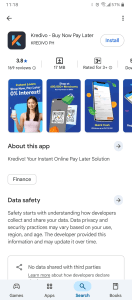
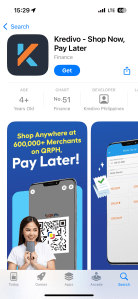
Google Play Store Apple App Store
2. To complete the application process you will need:
a. Submit your basic information
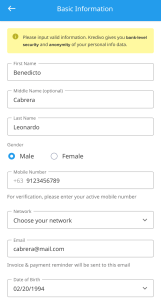

b. Submit 1 valid ID (Driver’s license, National ID, Digital National ID, ePhil ID, UMID)
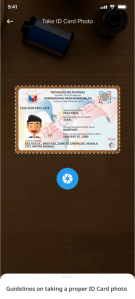
c. Enter your active email address
d. Enter your registered and active mobile number
Your application, if approved, will be processed within 24 hours during our operating hours (9 AM – 9 PM). You will receive a notification via email and SMS on the contact details provided in your application.
To apply for Kredivo, you must meet the following criteria:
– Filipino citizen, possessing a valid government issued ID (Driver’s license, National ID, Digital National ID, ePhil ID, UMID)
– 18 – 60 years old
– Currently reside in the Philippines
You can shop and scan-to-pay using QRPh from within your Kredivo App, across a lot of stores in the country. You can choose to pay in 1 month or opt for installments over 3 months, with a maximum 3.75% monthly interest rate across all tenors, without downpayment, nor needing a credit card.
Select Help Topic
 General
General
General  Delete Account
  Unlink Device
 Kredivo is the leading digital lending platform that provides customers with instant loan, based on real-time decisioning. Kredivo users can buy now and pay later with one of the lowest interest rates or get cash loans.
You can apply for Kredivo through the Kredivo app.
1. Get started by downloading Kredivo from Google Play Store or the Apple App Store (iOS)
Google Play Store Apple App Store
2. To complete the application process you will need
a. Submit your basic information
b.Submit 1 valid ID (Driver’s license, National ID, Digital National ID, ePhil ID, UMID)
c. Enter your active email address
d. Enter your registered and active mobile number
Your application, if approved, will be processed within 24 hours during our operating hours (9 AM – 9 PM). You will receive a notification via email and SMS on the contact details provided in your application.
To apply for Kredivo, you must meet the following criteria:
- Filipino citizen, possessing a valid government issued ID (Driver’s license, National ID, Digital National ID, ePhil ID, UMID)
- 18 – 60 years old
- Currently reside in the Philippines
Kredivo is available nationwide in the Philippines
Yes, you only need to submit a photo of your government-issued ID card and a selfie.
Depending on your account type you could fall into either of the below categories. Your interest rate, additional fee and tenure options will vary as per your categorization.
A. Basic User
1. QRPh Payments
- 1-Month Pay Later: 0% interest, 1% admin fee
- 3-Month Installment: 3.99% interest rate per month, 3% admin fee
2. Cash Loans
- 3-Month Installment 3.99% interest rate per month, 5% admin fee
3. Biller Payments
- 0% interest
- 1% admin fee
B. Premium User
1. QRPh Payments
- 1-Month Pay Later: 0% interest, 1% admin fee
- 3/6/9/12-Month Installment: 2.99% interest rate per month, 1% admin fee
2. Cash Loans
- 3/6-Month Installment: 2.99% interest rate per month, 5% admin fee
3. Biller Payments
- 0% interest
- 1% admin fee
Additional Terms
- 5% late payment interest on remaining balance monthly
- No registration or annual fees
- Rates are displayed on payment confirmation page
The transaction limit will be based on the approved credit limit from your application.
We regret to inform you that increasing your Kredivo credit limit is currently not possible.
Kredivo takes your privacy and personal information seriously and in accordance with the Data Privacy Act of 2012. We encrypt all of your data. We shall store, process and disclose your personal information in accordance with the consent provided by you and in accordance with our privacy policy.
We will never share or sell your personal data to a third party unless required in order to deliver our services and products or as mandated by regulators or law enforcement.
For more information about Kredivo, feel free to contact our customer service via email at support.ph@kredivo.com or call us at (+632) 8841 7920. We’re happy to help!
If you find a transaction you believe was not made by you, please report it to us within 24 hours from discovery of the transaction.
If you don’t report fraudulent transactions within this timeframe, your right to contest the same shall be deemed waived and you may no longer question legitimacy of such transactions. Please note that the aforementioned cancellation shall not apply to biller transactions, which include phone credit, mobile data, and electricity. Such transactions cannot be cancelled after they have been executed.
You can request for an official receipt by reaching out to customer service hotline at (+632) 8841 7920 or email via support.ph@kredivo.com
The phone call permission is a standard app verification process required to complete your application. Kredivo will only use this for account authentication and will not make unsolicited calls or misuse your personal information.
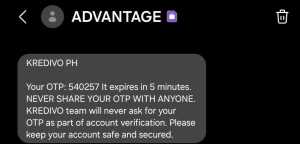
The OTP from ADVANTAGE is a Kredivo verification mechanism. This one-time password ensures secure account access. Kredivo personnel or agents will never request your OTP during account verification via call. Protect your account by keeping the OTP confidential.
If you find a transaction you believe was not made by you, please report it to us within 24 hours from discovery of the transaction.
If you don’t report fraudulent transactions within this timeframe, your right to contest the same shall be deemed waived and you may no longer question legitimacy of such transactions. Please note that the aforementioned cancellation shall not apply to biller transactions, which include phone credit, mobile data, and electricity. Such transactions cannot be cancelled after they have been executed.
There are a few possible reasons for this:
1. Your credit limit may not have been sufficient; or
2. If your credit limit was sufficient, you may have outstanding unpaid bill(s) that may have resulted in a temporary account suspension
3. The purchase may not have met Kredivo’s terms and conditions
Please contact Kredivo Customer Service at (+632) 8841 7920 or email via support.ph@kredivo.com if you have any further question.
Ensure that your transactions do not violate Kredivo’s terms of use, and maintain a good bill payment history. This will help facilitate easier approval for your future transactions.
If you repeatedly experience unapproved transactions, please try again within the next 24 hours and ensure that your transactions comply with Kredivo’s terms of use.
You can activate your Kredivo account once your application has been approved. We will send you Email confirming your approval.
To activate your account, go to the Kredivo app, click the activate button and follow the process.
Note: Do not delete your Kredivo app before activating the account, otherwise you have to wait 90 days to be able to register the account again.
After your account is active, you will receive an account activation confirmation email as well as your Kredivo Philippines User Onboarding Agreement. In this Agreement, you will be able to see your Identity Document’s photo, personal information, and the agreement’s contents that you have agreed to as a Kredivo user.
To check your Kredivo transaction history, simply open the Kredivo app and navigate to the ‘Transaction’ page.

1.Navigate to the ‘Transaction’ page.
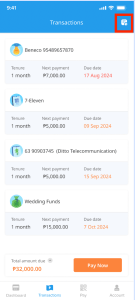
2. Click the upper-right corner icon.
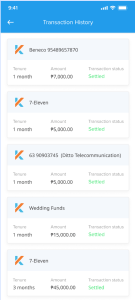
3.You can see your transaction history on the page.
Yes, you can contact our customer service at (+632) 8841 7920 or email us at support.ph@kredivo.com to close your account.
Please note, the account can only be closed once all outstanding loans are fully paid.
You can find Kredivo’s privacy policy here.
You can find Kredivo’s terms and conditions here.
You can always reset your Kredivo PIN by selecting the ‘Forgot Your PIN’ button on the login page. Remember, never share your Kredivo PIN or account details with anyone.
Once a transaction is made using your account credentials, you are fully responsible for any charges or actions resulting from the transaction. Please ensure the security of your login details to avoid unauthorized use.
If your account has been suspended due to unpaid bills, please settle all outstanding bills to reactivate your account.
If you have paid all your outstanding loans but still cannot reactivate your Kredivo account, please contact customer service at (+632) 8841 7920 or email us via support.ph@kredivo.com for assistance with reactivating your account.
Cash Loans is a Kredivo product that allows you to take cash disbursed to your bank/wallet account and pay it off in 3 or 6 monthly installments.
Depending on your account type you could fall into either of the below categories. Your interest rate, admin fee and tenure options for cash loans will vary as per your categorization.
A. Basic User
- 3-Month Installment 3.99% interest rate per month, 5% admin fee
B. Premium User
- 3/6-Month Installment: 2.99% interest rate per month, 5% admin fee
You will receive the funds within 1 (one) business day or earlier, if possible. If you haven’t received the money within this period, please contact our customer service at (+632) 8841 7920 or via email at support.ph@kredivo.com.
Cash Loans is available to all Kredivo users.
Few steps! Here’s how:
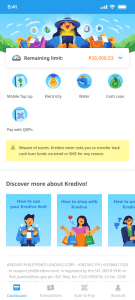
1. Open the Kredivo app and select ‘Cash Loans.’
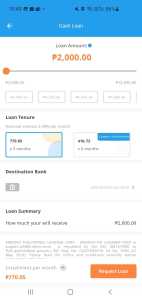
2. Choose your loan tenure, amount, and purpose.
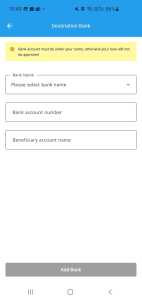
3. Add your destination bank.
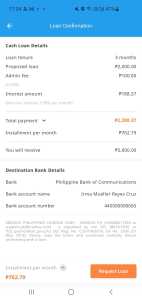
4. Enter your Kredivo PIN and OTP

5. Tap ‘Request.’
That’s it! You’ll receive the funds within 1 (one) business day (or earlier if possible).
The minimum transaction amount is PHP 1,500. The maximum transaction amount depends on your credit limit.
Yes, the availability of your Kredivo credit limit will be reduced by the loan amount. Once the loan is fully repaid, your credit limit will be restored.
Your Cash Loans will be disbursed to the destination bank/wallet account you provided. The bank/wallet account must be under the same name reflected in the government-issued ID you used to register your account.
Your payment will be due one month from the transaction date. However, if the transaction was made on the 31st and the following month has no 31st, the due date will fall on the last day of that month.
You can also check your due date in the cash loan transaction history within the app.
Late payment will incur a 5% monthly interest on the installment amount. If you do not pay by the due date, the 5% monthly interest will be charged to you.
Biller Service Payment on Kredivo allows you to pay your electricity, gas, water, and other bills as well as top up your mobile load or data at all major companies and operators in Philippines, and repay in 1 month. Please note there is no installment option for this product.
Biller Service Payments incur no interest (if repaid within/by the due date), but carry a 1% administrative fee.
Biller service is available to all Kredivo users.
Here’s how to purchase mobile load or data through Kredivo:

1. Select ‘Mobile Top-Up’ on the Kredivo dashboard.
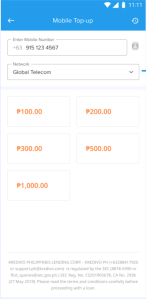
2. Input your mobile phone number and choose your network.
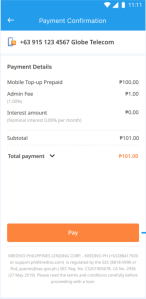
3. Select the top-up amount.

4. Input your Kredivo PIN.

5. Input the OTP code sent via SMS to complete the purchase.
Your mobile load or data will be added automatically.
We will send the transaction details via Email.
The exact credit amount available to each user may vary depending on their individual credit profile and the amount provided by the respective service providers. Users can make multiple transactions as long as they remain within their credit limit. Please note that the repayment tenor for this service is fixed at 1 month.
Yes, your Kredivo credit limit will be reduced by the loan amount. Once the loan is fully repaid, your credit limit will be restored.
Here’s how to pay your electricity bill through Kredivo:

1. Select ‘Electricity’ on the Kredivo dashboard.

2. Choose your electricity provider.
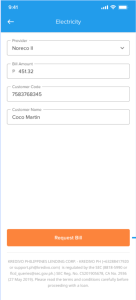
3. Input your customer code, then tap ‘Request Bill.’
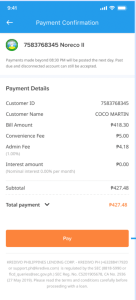
4. Check your bill amount in the payment details.
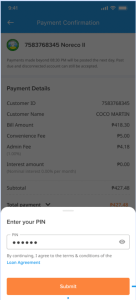
5. Input your Kredivo PIN.
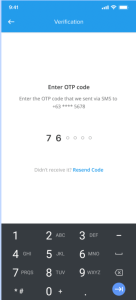
6. Input the OTP code sent via SMS to complete the payment.
We will send the transaction details via Email.
Don’t worry! If you haven’t received the mobile load or data within 10 minutes after purchase, you can report it to us at (+632) 8841 7920 or via email at support.ph@kredivo.com. We will review your report within 24 hours.
Please remember to always ensure that you enter the correct phone number when purchasing mobile load or data. We will not be able to refund your purchase if you input the wrong phone number.
If some of the biller payment services are not available, it means the service provider has not activated the payment option for that service.
Your payment will be due one month from the transaction date. However, if the transaction was made on the 31st and the following month has no 31st, the due date will fall on the last day of that month.
You can also check your due date in the Biller Service Payment transaction history within the app.
Late payment will incur a 5% monthly interest on the installment amount. If you do not pay by the due date, the 5% monthly interest will be charged to you.
You can shop and scan-to-pay using QRPh from within your Kredivo App, across a lot of stores in the country. You can choose to pay in 1 month or opt for installments over 3/6/9/12 months.
Depending on your account type you could fall into either of the below categories. Your interest rate, additional fee and tenure options for Kredivo QRPh will vary as per your categorization.
A. Basic User
– 1-Month Pay Later: 0% interest, 1% admin fee
– 3-Month Installment: 3.99% interest rate per month, 3% admin fee
B. Premium User
– 1-Month Pay Later: 0% interest, 1% admin fee
– 3/6/9/12-Month Installment: 2.99% interest rate per month, 1% admin fee
You can shop and scan-to-pay using QRPh from within your Kredivo App, across a lot of stores in the country.
You can choose to pay in 1 month or opt for installments over 3/6/9/12 months.
Kredivo on QRPh is available to all Kredivo users, everyone is eligible as long as they meet the minimum requirements.
The minimum transaction amount is PHP 1. The maximum transaction limit is basis the each users credit limit.
Yes, your Kredivo credit limit will be reduced by the loan amount. Once the loan is fully repaid, your credit limit will be restored.
You can purchase all products available at merchants accepting QRPh, based on their category, and in line with the Kredivo Terms and Conditions and your User Onboarding Agreement. Ensure your credit limit is sufficient for the selected tenor, which can be viewed from your Kredivo app.
After completing your checkout and confirming your purchase with Kredivo, you will receive a transaction confirmation by the merchant. Please contact the merchant directly for any updates on your purchase status.
Please note that transactions cannot be cancelled via the Kredivo app after completion. All cancellation requests must be handled directly with the merchant where you made your purchase.
Please note that all returns and refunds must be handled directly with the merchant where you made your purchase. While Kredivo facilitates your payment, the merchant manages their own return and refund policies.
If you encounter any issues with the items you purchased, please contact the merchant directly.
All refunds, including partial refunds, must be handled directly with the merchant where you made your purchase. Kredivo does not process or manage refunds. Your monthly payment obligations remain unchanged.
Your payment will be due one month from the transaction date. However, if the transaction was made on the 31st and the following month has no 31st, the due date will fall on the last day of that month.
You can also check your due date in the QRPh transaction history within the app.
Late payment will incur a 5% monthly interest on the installment amount. If you do not pay by the due date, the 5% monthly interest will be charged to you.
It’s easy! Here’s how:

1. Open the Kredivo app and go to the ‘Transactions’ page.
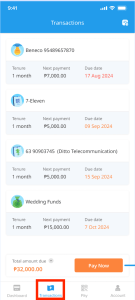
2. Tap ‘Pay.’

3. Enable the ‘Show future payment(s)’ toggle if you’d like to view upcoming payments.

4. Select the bill you want to pay.

5. Choose your preferred payment method.
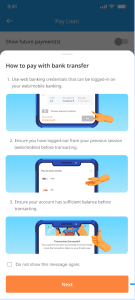
6. Follow the instructions based on the payment method to complete your payment.
Please note:
If you have multiple due loans, please make sure to pay the one with the nearest due date first before settling the next ones. This helps avoid any processing issues with your payments.
If two loans have the same due date, pay the first one displayed in the app before proceeding to the next.
Yes, we will send you push notifications from the Kredivo app, emails, reminder calls, to remind you about your upcoming payments.
Your payment will be due one month from the transaction date. However, if the transaction was made on the 31st and the following month has no 31st, the due date will fall on the last day of that month.
You can also check your due date in the transaction history section within the app.
Your account may be temporarily blocked until payment is made.
We’ll continue sending reminders, and if the payment remains unpaid, we may take further steps as outlined in the loan agreement. This could include using third-party collection services or reporting your unpaid bill to the Credit Information Corporation.
If you are facing specific circumstances that may prevent you from repaying your bill(s) in a timely manner, please contact Kredivo Customer Service immediately on (+632) 8841 7920 or via email at support.ph@kredivo.com.
Please review your bill details in the Kredivo app first. If you still find the bill amount incorrect, please report it to us via email at support.ph@kredivo.com. We’d be happy to assist you.
Certainly! Please contact Kredivo Customer Service on (+632) 8841 7920 or via email at support.ph@kredivo.com for your refund. Please note that the amount refunded will be net of all the related transaction processing fees.
If you have paid an excess amount and have not requested for the refund of such excess amount, it shall be automatically applied towards your next bill with Kredivo.
Choose from multiple convenient ways to repay your loan. All fees listed below are charged by the respective payment platforms, not by Kredivo.
Pay via QRPH
QRPH – no additional fees
Pay via Bank Transfer
BDO : 25 PHP instapay fee
BPI – no additional fees
LANDBANK : 15 PHP instapay fee
UnionBank : 10 PHP instapay fee
Metrobank – no additional fees
RCBC : 25 PHP instapay fee
Pay via E-Wallet
GCash : 15 PHP convenience fee
Maya : 15 PHP convenience fee
ProtectPlus covers accidental and liquid damage caused by sudden, unintentional events — like dropping your phone or spilling water on it.
Not covered:
– Intentional or negligent damage
– Normal wear and tear
– Unauthorized or third-party repairs
– Natural disasters (floods, earthquakes, etc.)
– Software problems or data loss
You must file your claim within 5 calendar days from when the damage happened.
Steps:
Step 1 – Go to https://customer.qoala.ph/
Step 2 – Log in using your registered email or phone number (OTP required)
Step 3 – Select your device, fill out the form, and upload clear photos
Step 4 – Submit and wait for confirmation via email or SMS
Late submissions may be rejected automatically.
What happens after I submit my claim?
Once submitted:
1. Qoala will review your claim and supporting documents
2. If approved, your device will be inspected at a Qoala-authorized service center
3. You’ll receive status updates via email or SMS throughout the process
4. If the device cannot be repaired or the repair cost exceeds its value, you’ll receive a like-for-like replacement, an equivalent model. Cash settlement is not allowed.
Once you have purchased ProtectPlus, there are no additional fees for valid claims.
Your claim may be rejected if:
1. It’s filed after 5 days
2. The damage isn’t covered
3. The device was repaired outside a Qoala service center
4. Documentation is incomplete or fraudulent
Repairs come with a 90-day guarantee, so if the same issue recurs, it will be fixed again at no additional cost.
You can delete your Kredivo account by going to the account page and clicking ‘Manage Account Status’ or you can contact our Customer Service team at (+632) 8841 7920 to request account closure or deletion. Please follow the instructions provided by the CS team to proceed with the next steps
You can delete your Kredivo account by going to the account page and clicking ‘Manage Account Status’ or you can contact our Customer Service team at (+632) 8841 7920 to request account closure or deletion. Please follow the instructions provided by the CS team to proceed with the next steps
You can delete your Kredivo account by going to the account page and clicking ‘Manage Account Status’ or you can contact our Customer Service team at (+632) 8841 7920 to request account closure or deletion. Please follow the instructions provided by the CS team to proceed with the next steps
You can only request to close or delete your account once all outstanding loans have been paid
You can delete your Kredivo account by going to the account page and clicking ‘Manage Account Status’ or you can contact our Customer Service team at (+632) 8841 7920 to request account closure or deletion. Please follow the instructions provided by the CS team to proceed with the next steps
There are a few reasons why you may be unable to close or delete your account, such as:
– You still have outstanding loans.
– Your account is currently ‘Blocked’ or ‘Suspended.’
The Customer Service team will inform you of the specific reason if your request cannot be processed
Yes, you can. Please resubmit your application as a new user and wait for approval from our system.
You cannot restore your account after it has been deleted. Your credentials will be automatically removed from our system, and your account will not be misused.
To continue using our services, please re-register as a new user and wait for approval.
“When you delete or remove your account, its status will be deactivated, and your login credentials will be removed from our system. This means you will no longer be able to log in to our application.
According to Article 96 of the Law on Credit Institutions (amended and supplemented) and guiding documents regulating the preservation of credit dossiers. Credit institutions must maintain the following records, including:
Credit institutions shall keep credit dossiers, including:
a. Credit contracts and documents stating loan use purposes, dossiers of security measures;
b. Reports on the financial status of clients;
c. Decisions on credit extension, bearing the signatures of competent persons;
d. Documents made in the use of loans related to credit contracts.
The time limit for keeping credit dossiers complies with the law.
To enhance your account security, Kredivo will limit access to one account per device at a time. This is to further protect your Kredivo account
You can unlink your device if you want to log in to your account on another device.
This feature is part of Kredivo’s latest product policy, which limits one account to one device at a time to enhance the security of your Kredivo account.
You can unlink your previous device by downloading the Kredivo app on your new device and logging in with your Kredivo account. The system will automatically prompt you for re-verification on the new device.
– Enter the OTP code.
– Take a selfie.
Once both are verified, your new device will be automatically linked, and the previous device will be unlinked.
If you encounter any issues while unlinking a device, please contact our customer service at support.ph@kredivo.com or call us at (+632) 8841 7920.
If you encounter this problem, please contact our customer service at (+632) 8841 7920 or email us at support.ph@kredivo.com to unlink the device or to take a selfie for verifying the new device.
For more information on unlinking your device, please refer to your Kredivo app.
If you have more than one device, you can only log in to your Kredivo account on one verified device at a time.
For example, if you have two devices—a phone and a tablet—and your phone has already been verified, you can use it to log in to your Kredivo account.
However, if you want to log in to your Kredivo account on an unverified device, such as your tablet, you must first unlink the device on your phone before logging in on the tablet.
You can unlink your previous device by downloading the Kredivo app on your new device and logging in with your Kredivo account. The system will automatically prompt you for re-verification on the new device.
– Enter the OTP code.
– Take a selfie.
Once both have been verified by the system, your new device will be automatically linked, and the previous device will be unlinked.
You can verify the new device before uninstalling the Kredivo app. Please follow the detailed instructions in your Kredivo app or contact our customer service for assistance.
First, when you log in to the new device, you will be prompted to verify it in order to access your Kredivo account. You must complete all the required steps to successfully log in to your new device.
If your device is stolen or lost, your account will not be automatically blocked; you must contact customer service to protect your account.
When you attempt to log in on the new device, you will be prompted to select a verification method, either by taking a selfie or by contacting our customer service to unlink the old device.
Once you complete the verification process, your account will be automatically logged out and unlinked from the old device. After verification, you can log in to your new device as usual using your Kredivo password and OTP.
After you contact our customer service team to unlink the device, the verification process may take a few minutes to up to 24 hours.
You cannot log in to your Kredivo account using your new mobile number on either the old or new device because it was not your registered mobile number initially.
To unlink your old device and update your Kredivo account with your new mobile number, please contact our customer service team at support.ph@kredivo.com or call (+632) 8841 7920. After that, you can log in to your new device using your updated mobile number.
Our customer service team will conduct background checks to verify that the unlink request comes from the account owner.
Alternatively, you can choose to unlink your device by verifying it with a selfie. When you use the selfie method, your old device will be automatically logged out, allowing you to log in with your new device.
When this new policy is implemented, you will be prompted to update your Kredivo app to the latest version. At that point, your account will be automatically logged out, and you will need to log in again on a verified device.
It’s not possible to log in until the new policy is implemented. You will be prompted to update to the latest version of the Kredivo app to access your account. You must complete all the steps to verify your existing device, after which all other devices will be automatically logged out and unlinked.
Need further assistance?
 Send an email
 Contact Customer Service